




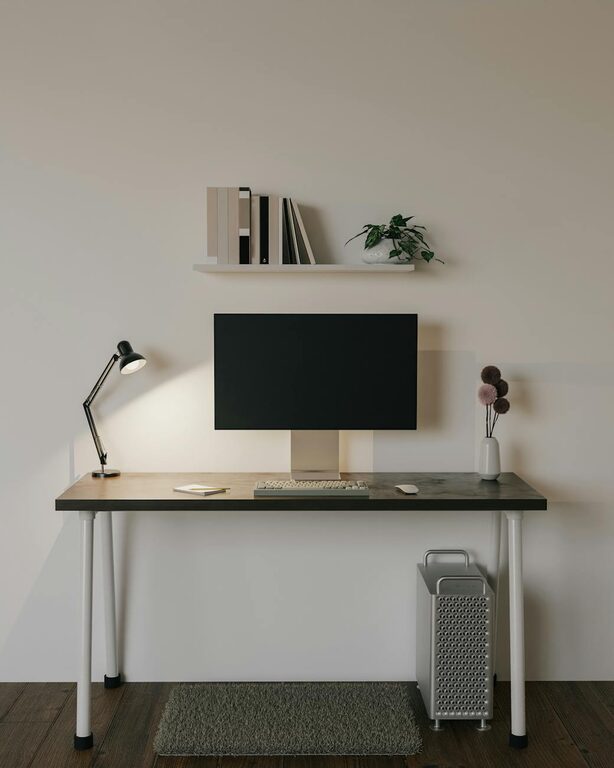
Creating a cozy and functional home workspace is essential for anyone working remotely or managing tasks from home. A well-designed workspace can boost productivity, reduce stress, and make working from home a more enjoyable experience. In this post, we’ll explore practical tips to help you transform any space into a comfortable and efficient work zone.
Choose the Right Location
The first step in creating a home workspace is selecting a suitable location. Consider these factors when picking your spot:
– Natural Light: Choose a space with plenty of natural light, if possible. Sunlight helps improve mood and focus.
– Quiet Environment: Find a quiet corner or room where distractions are limited.
– Privacy: If you live with others, ensure your workspace offers some level of privacy for calls or focused work.
– Space Availability: Make sure there is enough room for your desk, chair, and any equipment you need.
Invest in Ergonomic Furniture
Comfort is key to maintaining productivity and avoiding fatigue or injury.
– Ergonomic Chair: Select a chair that supports your back and promotes good posture. Adjustable height and lumbar support are important features.
– Desk: Choose a desk that fits your space and work style. If you prefer standing from time to time, consider a height-adjustable desk.
– Keyboard and Mouse: Use ergonomic accessories to reduce strain on your wrists.
Organize with Purpose
A cluttered workspace can hinder focus and creativity. Keep your area tidy by:
– Using Storage Solutions: Bins, shelves, and drawers keep supplies organized and off your desk.
– Decluttering Regularly: Remove unnecessary items to maintain a clean environment.
– Cable Management: Use clips or sleeves to keep cables neat and prevent tangling.
Personalize Your Workspace
Adding personal touches creates a welcoming atmosphere that encourages productivity.
– Plants: Small indoor plants can boost mood and air quality.
– Artwork or Photos: Display items that inspire or relax you without overwhelming the space.
– Comfort Items: Consider a cozy throw or cushion to make your chair more inviting.
Optimize Lighting
Proper lighting reduces eye strain and keeps you alert.
– Natural Light: Position your desk near a window to maximize daylight.
– Task Lighting: Use a desk lamp with adjustable brightness for focused work during darker hours.
– Avoid Glare: Arrange screens and lights to minimize reflections on your monitor.
Minimize Distractions
Creating boundaries between work and home life helps maintain concentration.
– Noise Control: Use noise-canceling headphones or a white noise machine if background sounds are unavoidable.
– Designate Work Hours: Set clear start and end times for work to stay disciplined.
– Limit Personal Electronics: Keep non-work-related devices out of your workspace to reduce distractions.
Use Technology Wisely
Equip your workspace with the right tools to enhance productivity.
– Reliable Internet: Ensure a strong Wi-Fi connection to avoid interruptions.
– Multiple Monitors: If your work requires it, extra screens can increase efficiency.
– Organizational Apps: Use calendars, to-do lists, and note-taking apps to manage tasks effectively.
Maintain a Healthy Routine
Your workspace should support not just your work but also your wellbeing.
– Take Breaks: Stand up, stretch, and walk around regularly.
– Stay Hydrated: Keep water nearby to stay refreshed.
– Exercise: Incorporate some physical activity during the day to reduce stiffness.
Final Thoughts
Creating a cozy and functional home workspace doesn’t require a large budget or space. By focusing on comfort, organization, and personalization, you can design an area that helps you work better and feel good doing it. Start with small changes and tailor your space to what suits your needs best. A thoughtfully arranged home workspace is a valuable investment in your productivity and wellbeing.


More Stories
Tips for Creating a Cozy and Productive Home Office Space
Tips for Creating a Cozy and Inviting Home Workspace
Tips for Creating a Cozy and Inviting Home Workspace